Learn how to choose the right WordPress theme that boosts your site’s design, speed, and user experience. Make your website stand out easily.
1.WordPress Theme: Define Your Website’s Purpose and Goals
Before you even start browsing WordPress theme, take a step back and clarify what your website is all about. This is the single most important step. Ask yourself:
What is the primary purpose of your website? Are you building a blog, an e-commerce store, a business portfolio, a news magazine, an online course platform, or something else entirely?
Who is your target audience? What are their demographics, preferences, and what kind of experience do you want them to have on your site?
What essential features do you need? Do you require an online shop, contact forms, portfolio galleries, event calendars, booking systems, or membership functionalities?
What kind of content will you be publishing? Will it be text-heavy, image-heavy, video-focused, or a mix?
Answering these questions will help you narrow down your search considerably. For instance, a photography portfolio needs a WordPress theme that prioritizes visual display, while an e-commerce store requires robust product showcasing and checkout features.
2. Prioritize Design and Aesthetics (But Don't Let Them Be the ONLY Factor
Of course, your website needs to look good! The visual appeal is often the first impression visitors get. When evaluating a WordPress theme design:
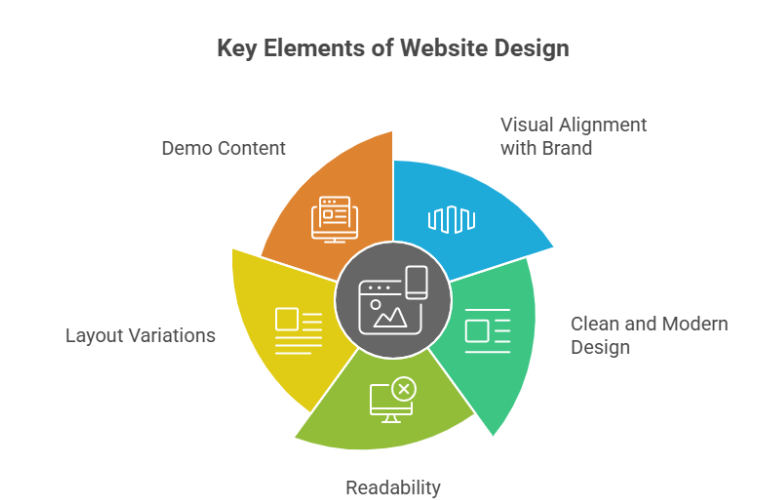
Visual Alignment with Your Brand: Does the theme’s overall aesthetic (colors, typography, imagery style) align with your brand identity? Your website should be an extension of your brand.
Clean and Modern Design: Opt for a clean, uncluttered design. While flashy animations might seem appealing, they can often distract users and slow down your site. Simplicity often leads to better user experience and performance.
Readability: Pay close attention to typography. Are the fonts easy to read on various devices? Is there enough contrast between the text and background?
Layout Variations: Does the WordPress theme offer multiple layout options for different pages (e.g., full-width, with sidebars, different blog post layouts)? This provides flexibility as your content grows.
Demo Content: Most themes come with demo content. Explore it thoroughly to see how your content might look. Can you easily replicate the demo site’s appearance?
Common Mistake to Avoid: Choosing a WordPress theme purely based on how it looks in the demo. Remember, functionality and performance are equally, if not more, important.
3. Responsiveness and Mobile-Friendliness: A Non-Negotiable
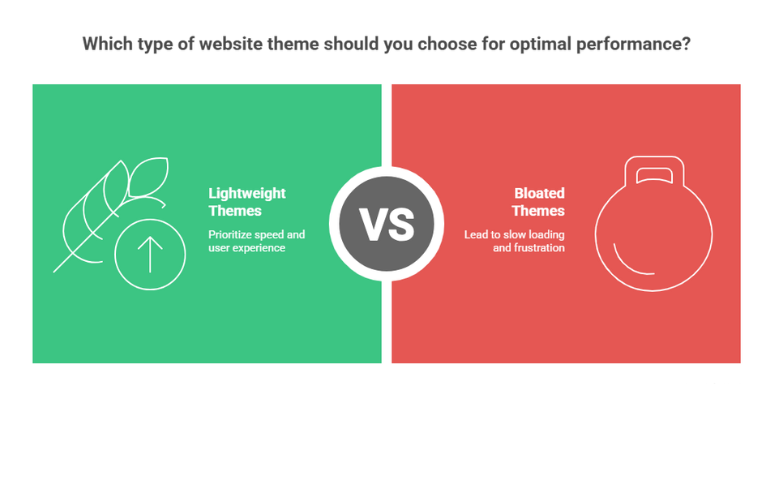
Look for a Lightweight WordPress Theme: Themes with excessive features, bloated code, and unnecessary animations can significantly slow down your site. Prioritize WordPress theme known for their lightweight and optimized code.
Test Demo Speed: Use tools like Google PageSpeed Insights, GTmetrix, or WebPageTest to analyze the demo site’s performance. While your actual site’s speed wilIn today’s mobile-first world, a responsive WordPress theme is essential. This means your website should adapt and display beautifully on all devices – desktops, laptops, tablets, and smartphones – regardless of screen size.
Why it matters: Google prioritizes mobile-friendly websites in its search rankings. A non-responsive site will not only alienate a significant portion of your audience but also negatively impact your SEO.
How to check: Most theme demos will have a responsive test feature. You can also simply resize your browser window or use your smartphone to view the demo site.
4. Performance and Speed: Crucial for User Experience and SEO
Website loading speed is a critical factor for both user experience and search engine rankings. A slow website leads to higher bounce rates and frustrated visitors.
l depend on your hosting and content, the theme’s performance in the demo is a good indicator.
Clean Codebase: While not always obvious to a non-developer, a WordPress theme built with clean, well-structured code will generally perform better and be more secure. Reviews and developer reputation can offer clues here.
5. Customization Options: Make It Your Own
Even if a theme looks perfect out of the box, you’ll likely want to make some tweaks to reflect your brand and specific needs.
WordPress Theme Customizer Integration: Good themes leverage the native WordPress Customizer, allowing you to change colors, fonts, layouts, header/footer elements, and more in real-time, without touching a single line of code.
Page Builder Compatibility: Many themes are designed to integrate seamlessly with popular drag-and-drop page builders like Elementor, Beaver Builder, or Visual Composer. If you plan to use a page builder for more complex layouts, ensure the WordPress theme supports it.
Pre-built Templates/Starter Sites: Some themes offer a library of pre-designed templates or full starter sites that you can import and customize, saving you a lot of time.
Flexibility vs. Bloat: While customization is good, be wary of WordPress themes that boast an overwhelming number of features you’ll never use. This can lead to “feature bloat” and negatively impact performance.
6. Plugin Compatibility: Extend Your Functionality
WordPress theme provide the look and feel, but plugins add specific functionalities. Your chosen WordPress theme must be compatible with the essential WordPress plugins you plan to use.
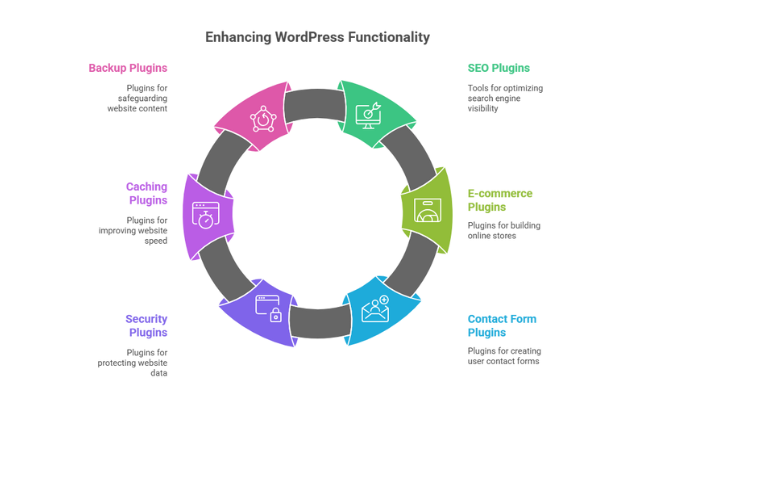
Essential Plugins: Consider plugins for SEO (Yoast SEO, Rank Math), e-commerce (WooCommerce), contact forms (Contact Form 7, WPForms), security, caching, and backups.
WooCommerce Ready (for e-commerce): If you’re building an online store, ensure the WordPress theme is explicitly “WooCommerce ready” or “WooCommerce compatible.” This means it’s designed to work seamlessly with the e-commerce plugin, providing dedicated shop pages, product layouts, and checkout functionalities.
Check Reviews and Documentation: Theme developers often list compatible plugins in their documentation or on their sales pages. User reviews can also highlight any compatibility issues.
7. Support and Updates: Long-Term Reliability
A WordPress theme is not a “set it and forget it” solution. Regular updates and reliable support are crucial for your website’s security, performance, and future compatibility.
Regular Updates: WordPress itself, along with plugins, receives frequent updates. Your theme needs to be updated regularly to ensure compatibility with the latest versions and to patch any security vulnerabilities. Check the “last updated” date.
Developer Support: Does the theme developer offer good support? Look for themes with active support forums, documentation, tutorials, and responsive customer service (especially for premium themes). Read reviews to gauge the quality of their support.
Community: For popular themes, a large user community can be a valuable resource for troubleshooting and getting advice.
8. Reviews and Ratings: Learn from Others' Experiences
User reviews and ratings offer invaluable insights into a theme’s real-world performance and the developer’s responsiveness.
Where to look: For free themes, check the WordPress.org theme directory. For premium themes, look at marketplaces like ThemeForest or the developer’s own website.
What to look for:
High ratings (4-5 stars): Generally a good sign.
Volume of reviews: More reviews often indicate a more popular and tested theme.
Recent reviews: Ensure the reviews are current and reflect the theme’s present state.
Developer responses to negative reviews: This can show their commitment to fixing issues and supporting users.
Look for patterns: One bad review isn’t a deal-breaker, but repeated complaints about the same issue are a red flag.
9. Free vs. Premium WordPress Theme: What's Right for You?
The choice between free and premium themes often comes down to budget, required features, and the level of support you anticipate needing.
Free Themes:
Pros: Cost-effective, good for basic blogs or personal sites, available directly from the WordPress.org theme directory (generally vetted for security).
Cons: Often have limited features and customization options, less dedicated support, may not be updated as frequently, and can sometimes be abandoned by developers.
Premium Themes:
Pros: More features, extensive customization options, dedicated support, regular updates, often include bundled plugins (e.g., page builders, sliders), and professional design.
Cons: Cost money (one-time purchase or subscription), can sometimes be “bloated” with unnecessary features.
Recommendation: For a serious business website or an e-commerce store, a premium theme is almost always the better investment due to the enhanced features, support, and long-term reliability.
10. SEO-Friendliness: Get Found Online
While content is king for SEO, your theme plays a significant role in how well search engines can crawl and index your site.
Clean Code Structure: An SEO-friendly theme uses clean, semantic HTML5 markup, which makes it easier for search engine bots to understand your content.
Fast Loading Speed: As mentioned, speed is a direct ranking factor.
Built-in SEO Features (Optional): Some themes offer basic SEO options, but it’s generally better to rely on dedicated SEO plugins for comprehensive optimization. Ensure the theme is compatible with popular SEO plugins like Yoast SEO or Rank Math.
Schema Markup (Advanced): Some themes include built-in schema markup, which helps search engines understand the context of your content (e.g., reviews, recipes, articles) and can lead to rich snippets in search results.
11. Browser Compatibility: Reach All Your Visitors
Your website needs to look and function consistently across different web browsers (Chrome, Firefox, Safari, Edge, etc.). Most reputable themes are tested for cross-browser compatibility, but it’s a good idea to quickly check the demo site in a few different browsers if you have specific concerns.
12. Security: Protect Your Investment
While WordPress core is generally secure, a poorly coded theme can introduce vulnerabilities.
Reputable Sources: Always download WordPress themes from trusted sources (WordPress.org, reputable theme marketplaces, or established theme developers). Avoid “nulled” or pirated themes, as they often contain malicious code.
Regular Updates: Frequent updates from the developer indicate they are actively maintaining the theme and patching any security loopholes.
The Selection Process: Putting It All Together
Define your needs: Start with your website’s purpose, target audience, and essential features.
Browse and shortlist: Based on your needs, search the WordPress.org theme directory (for free themes) or reputable marketplaces like ThemeForest, Envato Elements, or individual theme developer websites (for premium themes).
Read reviews and check ratings: Pay attention to recent feedback and developer support.
Explore demos thoroughly: Test responsiveness, check speed, and click through all pages to get a feel for the user experience.
Look for customization options: See how much control you have over the design elements.
Verify plugin compatibility: Especially for critical functionalities like e-commerce or forms.
Check for regular updates and support: Ensure the developer is actively maintaining the theme.
Consider your budget: Decide if a free or premium theme is right for your project.
Test before committing: If possible, install the theme on a staging site or local development environment to test it with your content before going live.
Final thoughts
For a serious business website or an e-commerce store, a premium theme is almost always the better investment due to the enhanced features, support, and long-term reliability.
Choosing the right WordPress theme is an investment in your website’s future. By carefully considering these factors, you’ll be well-equipped to select a theme that not only looks stunning but also performs flawlessly and supports your online goals for years to come. Happy theme hunting!